



Quantech Software.com Brings New Features to QMenus
Quantech Software.com added new functionality to its QMenus software, including a feature to help dealers meet new tax compliance guidelines.
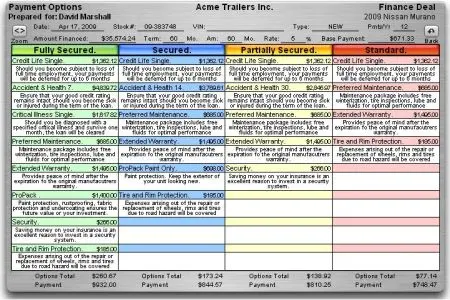
QMenus 1.5 menu can now show pricing beside each product in a group.
BRITISH COLUMBIA — Quantech Software.com added new functionality to its QMenus software, including a feature to help dealers meet new tax compliance guidelines.
The new system called Qmenus 1.5 has the
ability to show individual pricing beside each menu item, a new presentation
option that calculates and displays taxes in cash menus, and a new function
that auto-sizes menus to the maximum size of the screen it’s being shown on.
“I’m quite pleased about these new features,” said Mike Martin, general manager at Quantech. “Showing the price beside each menu item is a great addition as we move towards more complete disclosure with customers.” Users will be able to toggle the feature on or off depending on their presentation style, customer, or provincial law.
QMenus users will now be able to show the price including taxes on F&I products in a cash menu. “Our customers requested this,” said Martin. “In the past they would have had to either go into their F&I software or use a calculator to tell a customer how much the tax was.” This feature can also be toggled on or off.
Auto-sizing menus based on the screen it’s being shown on is another new feature. As the price of larger monitors goes down, more and more finance managers are electing to present from the screen as opposed to paper. “Full screen menu presentation is something our programmers have been working on for quite some time,” said Martin. “I can’t tell you how hot a QMenus menu looks when it’s displayed on a large monitor.”
Quantech has also added new tax calculation options to its lease menus. “Applying taxes on lease calculations is often complex, just ask anyone that’s tried to do them on a calculator,” said Martin. “As DMS providers strive to catch up with government regulations we always to try to be one step ahead. Our new options for calculating taxes do that. “
There will be no charge for current Quantech QMenus customers to upgrade to QMenus 1.5.
More Digital

Simple But Effective Hacking Surges
Data from the past year at U.S. auto dealerships finds that email and identity phishing are growing threat sources that can dispense with malware by exploiting trust.
Read More →
The Future of Car Dealerships
Artificial intelligence is reshaping the service-drive experience and will help retailers stay competitive.
Read More →
Structure Leads to Optimized Auto Listings
As the average car-buying journey has shifted to a blend of digital and retail, a dealership’s vehicle listings must be optimized to answer shoppers’ questions clearly and accurately.
Read More →
Real Intelligence
AI, though it presents many opportunities for productivity, efficiency and more, isn’t a one-for-one stand-in for people. It can augment human capital but not replace it altogether.
Read More →
Zurich Launches Advisor IQ for F&I Manager Coaching
The new platform uses real transaction data and artificial intelligence-driven insights to help car dealerships improve consistency and performance.
Read More →
F&I in the Digital Age
Digital retailing has not made the F&I manager obsolete. If anything, it has revealed how valuable the role can become when technology is used correctly.
Read More →
Need for Speed: EV Apps Lack Consistency
Fifty-five percent of surveyed EV owners said their mobile applications had a major or moderate impact on their purchasing decisions, but connectivity issues remain a problem.
Read More →
Four Keys to Your Digital Trail Defense
Federal regulators are cracking down on hidden fees. This protective measure could mean the difference between winning and losing a lawsuit or surviving a duel with the Dark Side.
Read More →
Hyundai Hosts Tech Talent Forum
Technology leaders from Hyundai Motor Group will have open discussions at the inaugural HMG Tech Talent Forum on topics ranging from autonomous driving to 'smart' manufacturing.
Read More →
Dealers Seek Actionable AI
Dealers are facing growing frustrations with current generic artificial intelligence tools, according to a survey by Lotlinx, which found they want a solution that understands their inventories.
Read More →